Kids Games: For Toddlers 3-5
- 4.3
- Rating
- 50.00M
- Installs
- Free
- Price
 Analysis by App-foxy
I spent time with Kids Games: For Toddlers 3-5 as a parent-facing test of whether it can become part of a child’s routine rather than just provide a few cheerful minutes on the first day. It is a free educational game from RV AppStudios, designed for young children and listed for Everyone. The basic promise is easy to understand: short learning activities that children can approach without needing to read instructions fluently.
My first impression was positive because the app feels aimed at the right stage of development. A toddler does not need a complicated menu, a long story, or a competitive ranking system. They need clear visual cues, simple objectives, and enough encouragement to try again. Kids Games: For Toddlers 3-5 works best when an adult introduces it calmly, watches the first few attempts, and then lets the child explore familiar activities independently.
What the first week feels like for a young child
The first sessions are likely to be the strongest part of the experience. Children in this age range often enjoy the immediate response that follows a tap, drag, or selection, and the game format makes practice feel less like a lesson. I found the appeal comes from the quick movement between action and feedback: the child does something, sees a result, and understands that another attempt is possible.
You May Also Like

 AccuWeather: Weather Radar
AccuWeather Review: A Quick, Clear Forecast for Everyday Decisions
For everyday plans, the best forecast is the one you can understand quickly. AccuWeather makes rain timing, radar, and local conditions easy to act on, with a few trade-offs.

 Hill Climb Racing
Why Hill Climb Racing Still Turns Crashes Into One More Run
A tiny car, a bumpy hill and one more upgrade: Hill Climb Racing keeps resurfacing because its simple chaos makes every near-miss feel personal.

 AliExpress - Shopping App
AliExpress Makes Global Shopping Feel Personal, but Shoppers Bear the Risk
AliExpress turns a global marketplace into a pocket-sized discovery engine. Its reach is useful, its shopping loop compelling, and its trade-offs easy to miss.

 Lords Mobile: Kingdom Wars
Lords Mobile Is a Kingdom-Building Routine, Not a Quick Match
A case-by-case verdict on the building, battles, device demands, and social commitments that make Lords Mobile rewarding for some players and exhausting for others.

 PDF Scanner app - TapScanner
TapScanner Makes Paperwork Easier to Capture, Check, and Share
TapScanner makes scanning with a phone feel less like a rescue operation and more like a dependable step in getting work done. Its capture tools are useful, though not flawless.

 Block Blast!
 Shows How Much a Puzzle Game Can Leave Out
A quiet grid game shows why puzzle players increasingly value instant clarity, repeatable skill and low-pressure play—and where the genre still needs to catch up.
More From Our News Desk
View All News


That rhythm matters. Traditional worksheets can be useful, but they depend heavily on an adult explaining the task and correcting mistakes. A general video app may hold attention longer, yet it usually asks the child to watch rather than make decisions. This game sits between those options. It gives the child something to do while keeping the activity light enough for a short break.
During the first week, I would use it in small windows instead of handing over the device for an open-ended session. A few activities before breakfast, a quiet period while a parent prepares dinner, or a short practice moment before leaving home are more suitable than treating it as a full afternoon of entertainment. The app’s educational value is easier to notice when the child is still attentive.
One practical tip is to sit nearby without answering every prompt. If a child immediately looks to an adult for help, I would first point to the screen and ask what they think should happen. That turns the game into a conversation about colors, shapes, positions, or counting rather than a test the parent solves on the child’s behalf. The app can support learning, but the adult’s questions often create the deeper benefit.
Another useful approach is to let the child repeat an activity after a mistake instead of rushing to the next one. Young players often tap quickly because they are excited, not because they understand the task. Repetition gives them a chance to slow down and notice the relationship between the instruction and the result. This is one of the more valuable ways to use a simple children’s game: not as a babysitter, but as a prompt for observation.
Why the age range matters
The title focuses on toddlers from three to five, and that makes sense for the level of independence expected. A younger child may still need an adult to guide nearly every interaction, while an older preschooler may finish familiar activities quickly and begin looking for more demanding challenges. Families with children at different stages should expect the same activity to feel very different from one child to another.
For a three-year-old, the main achievement may be understanding where to tap and staying with one task. For a five-year-old, the useful part may be practicing recognition, following directions, or explaining why an answer is correct. I would not judge the app only by how long it keeps an older child busy. Its purpose is better measured by whether the child engages with a concept and can talk about it afterward.
Adults should also remember that a child’s performance on a screen does not automatically prove mastery away from it. If the game involves identifying something, I would follow up with a real-world example: ask the child to find a matching object in the room, sort toys, or describe what they noticed. That simple transfer step helps prevent the experience from becoming only a sequence of taps.
What keeps the novelty alive after the opening sessions
The app benefits from being broad rather than tied to one narrow lesson. Its educational-game format gives families a way to vary the type of activity, which can make the first several sessions feel fresher than repeating one worksheet or one flashcard deck. That variety is especially helpful when a child is interested in one skill one day and something completely different the next.
Still, novelty has a limit. A child may enjoy a new visual response repeatedly, but repeated exposure eventually reveals the underlying pattern. When that happens, I would change the way the app is used rather than simply increasing screen time. Ask the child to predict the answer before touching the screen, say the relevant word aloud, or explain the choice to a sibling. These small changes make familiar content more active.
The strongest long-term use is guided repetition, not passive replay. That distinction is important for parents deciding whether the game deserves a regular place on a device. If the child only taps through familiar activities as quickly as possible, the educational return will fade. If the child uses the activities as practice and discussion starters, the same material can remain useful for longer.
Month-to-month value and everyday routines
After the first month, I would expect the app to work best as one tool inside a larger preschool routine. It is not a replacement for books, drawing, building, outdoor play, conversation, or hands-on sorting. Its role is more modest and more realistic: it can provide a structured digital activity when a child needs a change of pace or when an adult wants a quick way to reinforce early concepts.
A realistic household example would be a parent who has ten quiet minutes before an appointment. Instead of opening an unrestricted entertainment feed, the parent can start a short activity, stay close enough to help, and then ask the child what they practiced. The value is not only in those minutes on the screen. It is in having a predictable transition that does not require setting up craft supplies or carrying a collection of physical games.
For travel, the appeal is obvious, but I would prepare expectations carefully. A digital activity can be convenient in a waiting room or during a long journey, yet it should not become the only strategy for keeping a child settled. Bringing a book, a small toy, or a simple conversation game gives the child a break from the screen and reduces the chance that the app becomes associated with every moment of boredom.
Families often ask whether a free app is suitable for regular use. In this case, the answer depends less on the price and more on supervision and fit. Free makes it easy to try without a financial commitment, but it does not remove the need to check whether the child is actually learning, becoming frustrated, or simply chasing the next visual response. I would treat the cost advantage as a reason to test it, not as proof that it belongs in every routine.
The app has reached over fifty million installs and holds a 4.6 average from around fifty-one thousand ratings, which suggests that many families have found the format accessible. Those figures do not tell me whether it will suit a particular child, but they do make it easier to view the game as an established option rather than an obscure experiment. Its current version is 1.6.6, and it supports devices running Android 6.0 or later.
How it compares with common alternatives
Compared with paper activity books, the game offers faster feedback and less preparation. A child can begin immediately, and the interactive response may encourage a reluctant learner to try. Paper still wins when the goal is pencil control, drawing, tracing, or a screen-free quiet period. I would choose both rather than treating one as a complete substitute for the other.
Compared with broad children’s video platforms, this app asks for more active participation. That is a meaningful advantage when a parent wants the child to make choices instead of watching an endless stream. Video may be better for music, storytelling, or movement breaks, while this game is more appropriate when the child needs a focused task.
Compared with dedicated early-learning subscriptions, a free game can be less intimidating for a family that only wants occasional practice. A subscription service may offer a more carefully sequenced curriculum or stronger progress tracking, but it also demands a longer commitment and may feel excessive for a child who uses learning games only now and then. I would move to a more structured alternative if the child needs a clear progression toward a specific school-readiness goal.
Compared with physical educational toys, the app is easier to store and carry, but it cannot provide the same tactile experience. Sorting real objects, turning pages, building with blocks, and speaking face to face develop skills that a touchscreen cannot reproduce. The game is most convincing as a supplement for moments when portability and instant setup matter.
Maintenance, fatigue, and the work required from parents
The main maintenance burden is not technical; it is behavioral. Parents need to decide when the app is appropriate, notice when the child is rushing, and stop the session before tiredness turns learning into conflict. That can be harder than it sounds, especially in a busy household where the device is already being used for several other purposes.
I would create a simple rule: the game starts after the child knows what the session is for and ends when that purpose is finished. For example, a parent might say that the child will try a few activities and then choose a non-screen activity. This gives the app a clear place in the day and reduces negotiations over whether one more round is allowed.
Another maintenance issue is keeping the experience fresh without constantly searching for new content. Rather than expecting the app to provide endless novelty, rotate how the child interacts with it. One day, the child can work independently. Another day, the parent can ask prediction questions. A sibling can take the role of “teacher,” provided the interaction stays friendly and does not turn into correcting or competing.
Fatigue can come from repetition, but it can also come from the child’s developmental level. If a three-year-old cannot understand the instruction without repeated adult intervention, the activity may be too demanding for that moment. If a five-year-old completes everything automatically, the activity may be too easy. In either case, more time is not the answer. Shorter sessions, more conversation, or a different learning tool may be better.
There is also a risk that a child begins to value the reward of finishing more than the idea being practiced. I would watch for rapid tapping, guessing without looking, or asking to restart immediately after completing an activity. Those behaviors are signs to pause and discuss what happened. The app remains useful when the child is thinking; it becomes less useful when it is merely filling silence.
Who should use it and who should skip it
I would recommend trying it for families with preschool children who want an accessible collection of educational activities, especially when they need something portable and easy to start. It is also a reasonable option for parents who prefer to test a free game before investing in a more comprehensive learning platform.
I would be more cautious for families seeking detailed progress reports, a formal curriculum, or lessons matched to a specific educational plan. This is a game, not a substitute for professional assessment or individualized teaching. Children who strongly dislike touchscreens, become overstimulated by digital rewards, or need hands-on movement may gain more from physical activities.
It may also be the wrong choice for a child who is already far beyond basic preschool practice. An older or advanced learner could find the activities repetitive, and a parent might get better value from a more challenging educational app, a library book, or an activity that encourages writing and problem-solving. The age label is a useful starting point, not a guarantee of equal difficulty for every child.
The Everyone rating makes the app broadly suitable from a content perspective, but parents should still make their own decision about screen use and supervision. A child-friendly age classification does not tell you how long a particular child should play or whether the app fits the family’s household rules.
My long-term verdict
After the initial excitement fades, Kids Games: For Toddlers 3-5 earns space best as a small, repeatable part of a preschool toolkit. I would not install it expecting a complete learning program or unlimited entertainment. I would keep it for short practice sessions, travel, waiting periods, and moments when a child benefits from a clear digital task.
Its lasting value depends on the adult using it deliberately. The game can encourage recognition, following directions, and early problem-solving, but those benefits become stronger when a parent connects the screen activity to real objects, spoken language, and everyday play. Without that connection, the child may simply memorize how to move through familiar prompts.
RV AppStudios has made a free educational game that is easy to try and broadly approachable. The large install base and strong average rating support its appeal, while the simple format explains why it can fit into many homes. At the same time, neither popularity nor convenience removes the normal limitations of preschool screen learning: repetition, short attention spans, and the need for adult judgment.
My recommendation is to keep it if your child returns to it thoughtfully, not merely automatically. Use it in brief sessions, vary the follow-up activity, and replace it when the content no longer challenges or interests the child. With that approach, it can remain a useful companion to books and hands-on play. If you need a complete curriculum, deep progress tracking, or a screen-free learning experience, choose a different option. For families looking for a free and practical introduction to educational games for toddlers, however, Kids Games: For Toddlers 3-5 is worth trying and judging by the quality of the child’s engagement over time.
The game was released on February 22, 2022, and its free access lowers the barrier to a trial. I would start with a parent beside the child, establish a clear stopping point, and revisit the decision after several weeks. If the app supports calmer routines and leads to conversations beyond the screen, it has earned its place. If it only creates requests for more screen time, the better long-term choice is to put it aside.
FAQs for Kids Games: For Toddlers 3-5
01What age group is Kids Games: For Toddlers 3-5 suitable for?
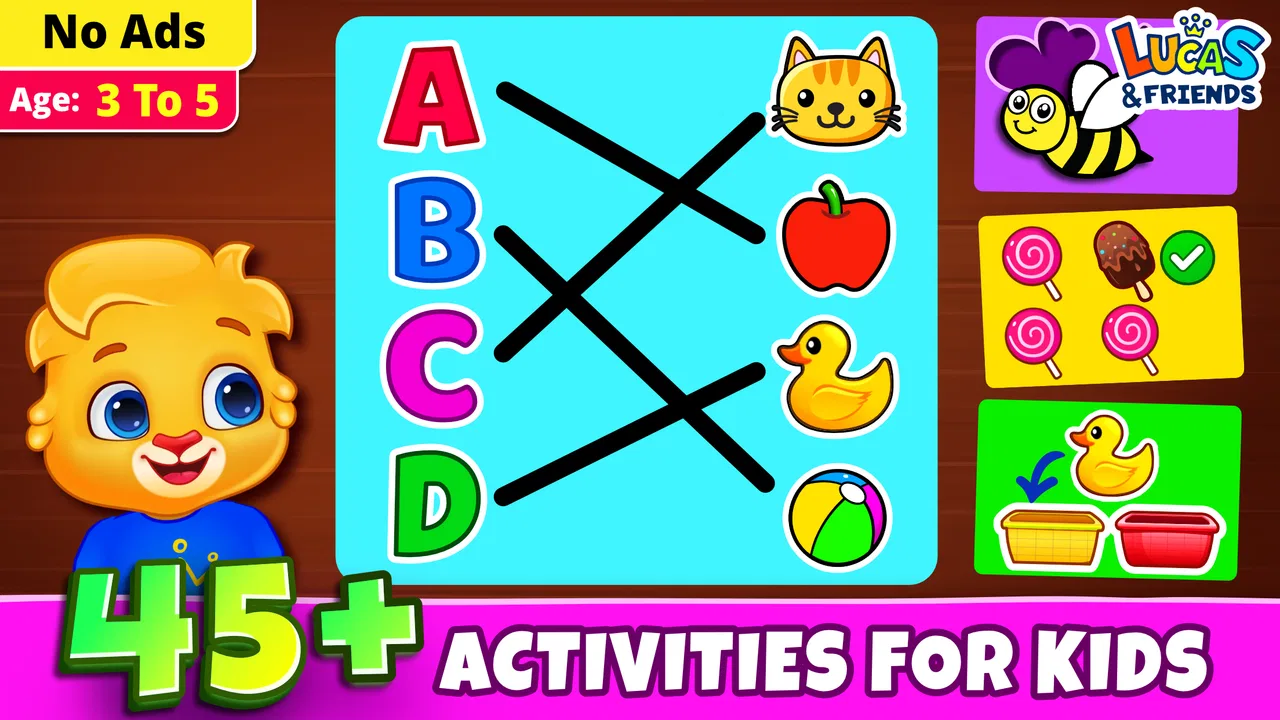
Kids Games: For Toddlers 3-5 is specifically designed for children between the ages of 3 to 5. The app offers age-appropriate content that focuses on developing basic skills such as counting, shape recognition, and color identification, ensuring that the activities align with early childhood learning capabilities.
02Is Kids Games: For Toddlers 3-5 safe for my child to use?
Yes, Kids Games: For Toddlers 3-5 prioritizes safety and offers a child-friendly environment. The app is free from inappropriate content and ads, providing a secure space for children to explore and learn. Additionally, parental controls can be set to manage screen time and monitor activity.
03What types of games and activities are included in the app?
Kids Games: For Toddlers 3-5 includes a variety of educational games and activities such as puzzles, memory games, and simple math tasks. These activities are designed to enhance cognitive skills, hand-eye coordination, and creativity, all while keeping the experience enjoyable and engaging for young children.
04Can Kids Games: For Toddlers 3-5 be used offline?
Yes, the app can be used offline, making it convenient for travel and areas with limited internet connectivity. Once downloaded, all the games and activities are fully accessible without requiring an internet connection, allowing uninterrupted playtime for your child.
05Are there in-app purchases in Kids Games: For Toddlers 3-5?
Kids Games: For Toddlers 3-5 offers some in-app purchases to unlock additional content and features. However, the core activities are available for free. Parents can control and disable in-app purchases through device settings to prevent accidental purchases by children.
Pros
- Engaging and colorful graphics.
- Simple controls perfect for toddlers.
- Educational content with fun elements.
- Wide variety of mini-games.
- No ads in the paid version.
Cons
- Limited free content.
- In-app purchases can be pricey.
- Requires internet for some features.
- Some games may repeat concepts.
- Occasional lag on older devices.

Kids Games: For Toddlers 3-5
Gallery